
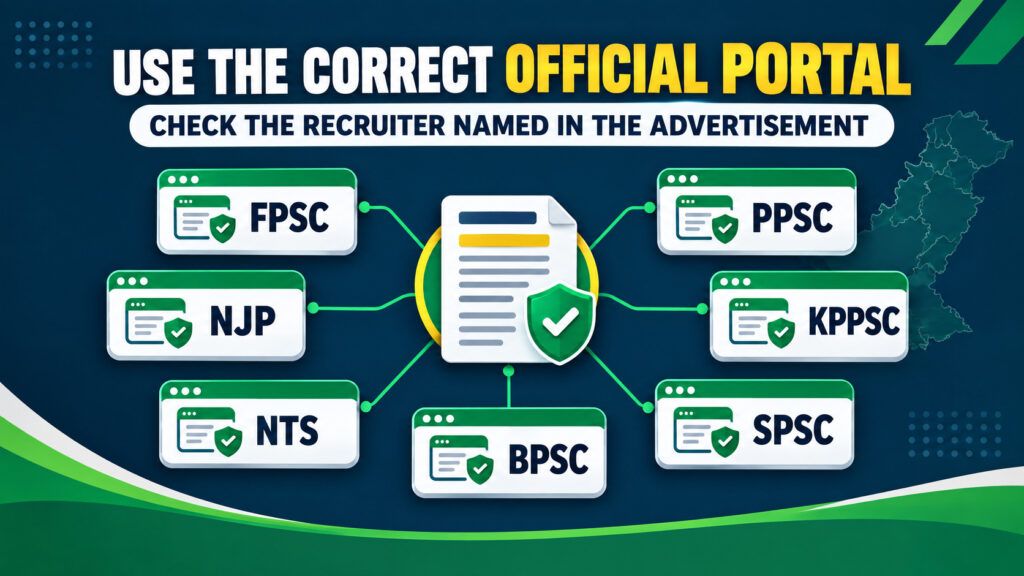
If you want to check government job application status in Pakistan, first identify the organization named in the advertisement. There is no single government job application status portal for every vacancy: FPSC, NJP, NTS, provincial public service commissions, and individual departments use different application and result systems. The correct status page is the official recruiter’s page, not necessarily the website where you first saw the vacancy.
Quick answer
Use this sequence:
- Read the advertisement and identify the official recruiter or testing service.
- Gather your CNIC, case/post/project details, application or tracking number, payment proof, and submission confirmation.
- Check the recruiter’s official candidate account, application-tracking page, eligible/rejected list, schedule, admission document, or result page.
- Treat a submission confirmation as proof of filing only. It is not the same as eligibility, shortlisting, a test call, recommendation, or appointment.
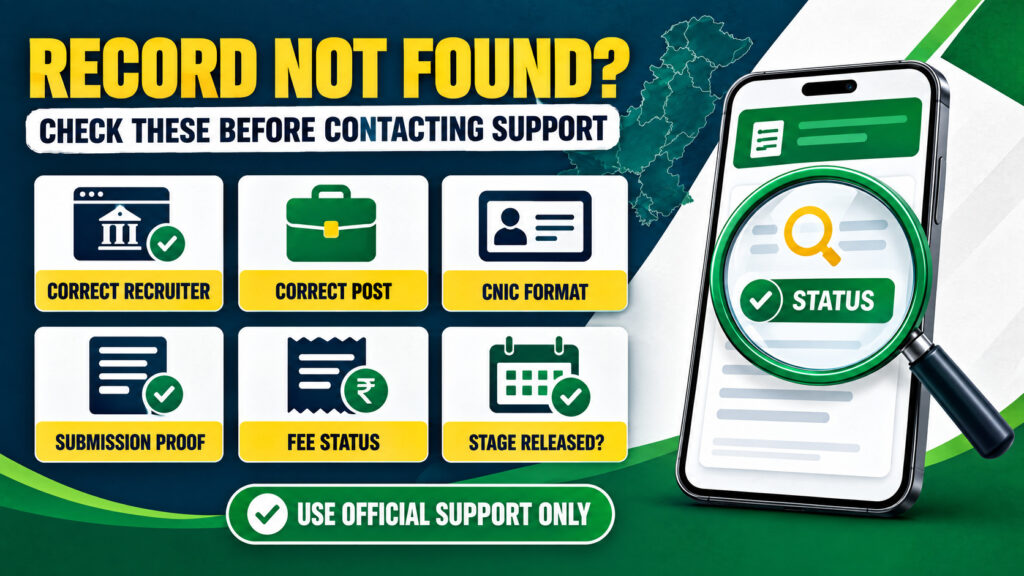
- If the record is missing, verify the exact post, identifier, CNIC format, fee status, and whether that recruitment stage has actually been published before contacting official support.
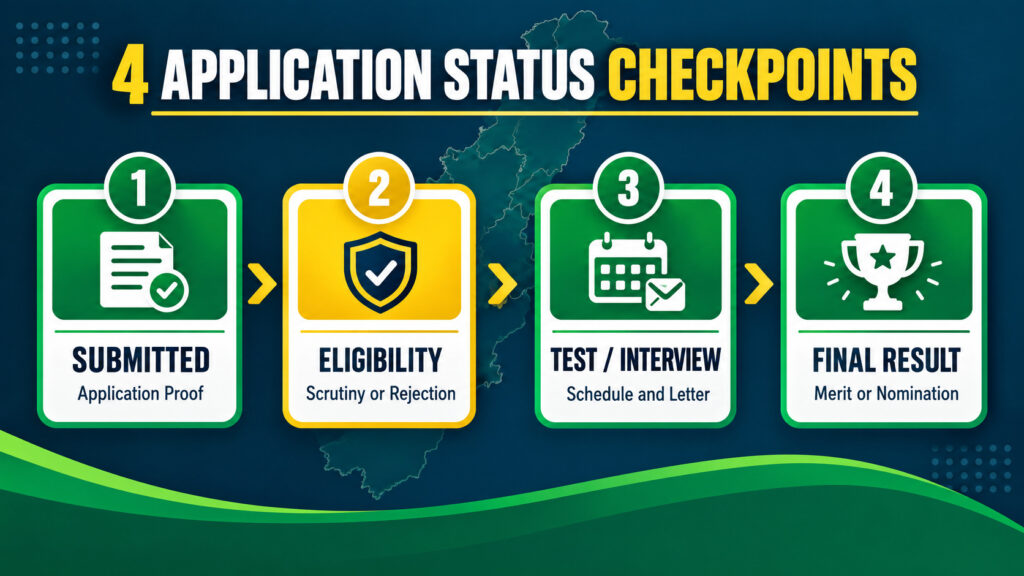
The recruitment journey normally has four separate checkpoints:
- Checkpoint 1 — Successful submission/proof: Did the portal accept the complete application, and can you retrieve a confirmation, application number, tracking ID, or printable form?
- Checkpoint 2 — Eligibility/scrutiny or rejection: Has the recruiter reviewed the application, placed you in an eligible or provisional list, raised a deficiency, or rejected the application?
- Checkpoint 3 — Test/interview schedule and admission document: Have you been assigned a test date, interview, roll number, Admission Certificate, Admission Letter, E-Letter, or another admission document?
- Checkpoint 4 — Written/final result, merit or nomination: What was the result, and has the recruiter issued a shortlist, merit list, recommendation, nomination, or final selection notice?
A candidate can pass one checkpoint and still be unsuccessful at a later one. In particular, an admission document or written-test PASS is not a final selection. Keep checking the official source for the next stage.
What does “application status” actually mean?
The phrase application status is used for several different questions:
- Did I finish the application, or did I only generate a fee slip or save a draft?
- Was my fee received and connected to the correct post or case?
- Was my application accepted for scrutiny, marked eligible, placed in a provisional list, or rejected/ineligible?
- Am I shortlisted or called for a written, screening, physical, skill, or interview stage?
- Where is my test date or roll number/admission document?
- Did I pass the written test, appear on a merit list, receive a recommendation, or become finally selected?
These questions are related, but they are not interchangeable. FPSC, for example, separates successful submission and tracking from eligibility, Admission Certificates, written results, shortlisting, interviews, nominations, and marksheets. NTS likewise separates portal payment and application records from project specific eligible/rejected lists, roll-number slips, interview lists, and results. Therefore, track government job application by following the recruitment stages published by the named authority rather than looking for one universal label.
Common status wording and what to do next
The wording below is a practical guide, not a list of labels that every portal uses. A recruiter may use a PDF list, a button, a notice, an account-only message, or a different term altogether. Read the post-specific instructions and any reason or condition shown beside the status.
| Wording you may see | Likely meaning | Sensible next action |
| Submitted | The portal records a completed filing or submission event. | Save the confirmation, application number, tracking ID, and submitted form. Do not assume eligibility yet. |
| Payment pending | The required fee has not yet been matched or confirmed in that system. | Check the correct PSID/challan, transaction record, post, CNIC, and payment instructions. Do not pay twice without official guidance. |
| Paid | The system has recorded payment; in some systems, this still relates to payment rather than final submission. NTS, for example, makes a printable application available when the relevant status is PAID. | Confirm whether a separate final submit step is required and save the fee receipt. |
| Under review | The application or documents are being considered, or the portal has not published a later decision. | Check the advertisement, scrutiny notices, deficiency instructions, and official account or list. Avoid assuming acceptance or rejection from silence. |
| Provisionally eligible | The candidate appears eligible at an interim stage, possibly subject to conditions, objections, documents, or later scrutiny. | Read the list and conditions carefully; keep originals and respond only through the stated official route. |
| Eligible | The candidate has been included in an eligibility or scrutiny outcome for that stage. | Monitor the test schedule, admission document, and later notices. Eligibility is not selection. |
| Rejected / Ineligible | The application was not accepted for the stated stage, often with a reason or a separate list. | Read the official reason and objection or correction procedure, if one is provided. |
| Shortlisted | The candidate has moved to a limited next-stage group. | Follow the interview, document verification, test, or call letter instructions. Shortlisting is not final appointment. |
| Test scheduled | A test stage has been arranged for a particular post or phase. | Download the official roll number slip or admission document when activated and follow the published instructions. |
| Interview called | The recruiter has issued an interview call or placed the candidate in an interview programme. | Check date, venue, documents, and reporting instructions on the official notice. |
| Recommended / Selected | The candidate has reached a recommendation or selection outcome described by that authority. | Read the complete notice for conditions, nomination, verification, medical, joining, or appointment requirements. |
| Record not found | The search produced no matching record; it does not by itself prove rejection. | Check the recruiter, post/case/project, CNIC format, identifier, submission and fee status, and whether the relevant list or stage is live. |
Before you check: keep these details ready
Status pages often require a combination of identifiers. Prepare the following before opening a portal:
- Official recruiter: FPSC, NJP, NTS, PPSC, KPPSC, SPSC, BPSC, a department, or another authority named in the advertisement.
- Advertisement, case, post, or project: Note the exact title, case number, serial number, advertisement number, department, and year where available.
- CNIC: Use the format requested by the official page. Some searches may ask for dashes; others may not.
- Tracking, application, token, or reference identifier: This may be an FPSC Tracking ID, a PPSC Application Number and Edit Token Number, an NTS application record, an NJP account record, or another number.
- Submission proof: Keep the successful-submission screen, confirmation email or SMS, submitted form, printable application, or acknowledgement receipt.
- Payment receipt: Keep the PSID, challan, fee-slip, transaction ID, or bank receipt where a fee was required.
- Email and mobile number: Check the contact details used on the application, including spam or filtered messages, but do not rely only on SMS or email.
If you have not yet applied, our guide to how to apply for government jobs in Pakistan explains the wider process. For document preparation, see documents required for government jobs in Pakistan, and for fee records see the government job application fee guide.
General process to check a government job application
Step 1: Return to the advertisement
Find the complete official advertisement, not only a forwarded image or social media summary. Confirm who accepts the application and who conducts the test or publishes the result. A department may use a commission, NTS, NJP, or its own recruitment system.
If you need help verifying a vacancy before entering personal information, use our guide to find genuine government jobs in Pakistan.
Step 2: Open the official domain independently
Type the official address or reach it from the recruiter’s own homepage. Check the spelling of the domain before entering CNIC, password, OTP, payment information, or an application identifier. Search results and forwarded links can lead to unofficial pages that imitate a status form.
Step 3: Choose the right service
Look for a service named Application Tracking, My Applications, Job History, Candidate Portal, Eligible/Rejected List, Admission Certificate, Admission Letter, E-Letters, Written Results, Final Results, Merit List, Nominations, or a similar label. The right service depends on the checkpoint you are checking.
Step 4: Select the exact recruitment
Choose the correct post, case, advertisement, project, test phase, or year. A portal can contain several similar vacancies. Selecting a current post instead of the one you applied for can produce a misleading “record not found” result.
Step 5: Enter only the requested information
Use the CNIC, tracking ID, application number, token, name, password, or verification code requested by the official page. Do not try random combinations on a suspicious website. Never send your login password, OTP, PIN, or full unmasked identity document to a person offering to check the record.
Step 6: Save the result securely
Download or print the status page, list, admission document, or result where the official website allows it. Save the URL, date checked, post/case/project, and any reference number. If you take a screenshot for support, mask most of your CNIC, tracking number, phone number, and other private details.
Step 7: Move to the next checkpoint
A successful submission should lead you to monitor scrutiny or eligibility. An eligible list should lead you to check a test or interview schedule. A test result should lead you to check shortlisting, interview, merit, nomination, or final result. Do not stop at the first confirmation message.
Official methods by recruiter
The following routes are based on the research checked for this guide. Portals are dynamic: a page may be login gated, project specific, temporarily unavailable, or replaced by a notice. Always follow the current advertisement and live official instructions.
FPSC application status by CNIC and Tracking ID
For FPSC General Recruitment, the application tracking route is a confirmed public service at the FPSC recruitment portal. The current tracking page asks for the candidate’s CNIC, Tracking ID, and verification code; FPSC also provides a separate recovery page when a Tracking ID has been lost.
Use this route for Checkpoint 1 — submission proof:
- 1. Open the official FPSC application tracking page.
- 2. Enter the requested CNIC, Tracking ID, and verification code.
- 3. Open or print the submitted application if the page returns the record.
- 4. Compare the post, case, personal information, and submission details with your saved copy.
If you lost the Tracking ID, use the official FPSC tracking-ID recovery page, which uses the fields shown by FPSC, including CNIC, date of birth, and verification code.
Do not use the tracking page as if it were a complete FPSC selection dashboard. FPSC publishes later checkpoints through separate official routes, including the General Recruitment schedule, written results, shortlisting, and nominations.
- Test date and admission document: Check the current FPSC General Recruitment schedule and the admission certificate route linked from the official FPSC site. A certificate or test call shows progression to that examination stage, not appointment.
- Written result: Use the FPSC written-results section. A written-test PASS does not by itself mean interview selection or final appointment.
- Shortlisting and final outcomes: Check FPSC shortlisting and FPSC nominations for the relevant case.
This method concerns the FPSC process identified in the advertisement. CSS, MPT, and other examinations can use different instructions and services, so do not assume that General Recruitment tracking applies to every FPSC examination.
For the application workflow itself, see our how to apply online for FPSC jobs guide.
NJP application status
NJP provides application tracking and status updates through the candidate account, but the account-level dashboard and applications route are login gated. Public pages do not expose every signed-in status label, so do not guess what a particular NJP label will be before logging in.
To check NJP application status:
- 1. Open the official NJP website or its login page.
- 2. Sign in with your own candidate credentials.
- 3. Open the candidate applications area or the vacancy record in the signed-in account.
- 4. Confirm that the record belongs to the exact job and employer.
- 5. Save the application reference or status information displayed by the account.
Creating an NJP profile is not the same as applying for a vacancy. Registration and CV completion prepare the account; a candidate must open the live job, choose Apply, complete the requested sections, and submit. If there is no application record, do not treat a completed profile or a viewed job page as proof of submission.
NJP’s public pages are not a universal result tracker for FPSC, PPSC, NTS, or every department. When an NJP advertisement identifies another organization as the recruiter or asks for an additional step, follow that instruction too. For account and application setup, read our NJP registration and government job application guide.
NTS application status check by CNIC
NTS separates portal submission and payment from project specific candidate lists and results. The NTS candidate manual states that an application is complete after fee payment; My Applications provides fee slip, payment status, and application options, and a printable application becomes available when the status is PAID.
For a portal application:
- 1. Open the official NTS candidate portal.
- 2. Sign in and open My Applications.
- 3. Check the relevant fee-slip, payment status, and printable application record.
- 4. Confirm that the project, post, CNIC, and payment record match your receipt.
For later checkpoints, open the NTS candidates/project lists. Select the exact employer and project, then use the search fields shown for that project. Current project records may use a name or CNIC with a verification code for an eligibility list, or a roll number or CNIC with a verification code for a final result.
NTS commonly separates:
- Provisional List (Eligible/Rejected): Check whether the application was accepted for that project’s stage and read any stated reason or objection instruction.
- Written Test (Roll No Slip): Check the test stage record and admission document when the project activates it.
- Interview or other test-stage lists: Follow the project’s own candidate record and notice.
- Results: Use the official NTS results page and select the correct project or result type.
Thus, “NTS application status check by CNIC” may mean a portal payment/application lookup or a project specific eligible list, roll-slip, or result search. It is not one universal NTS screen. NTS also advises candidates to monitor its website for eligibility, test dates, and roll-number slips rather than relying only on SMS.
PPSC application status check by CNIC
PPSC confirms successful submission with an Application Number and Edit Token Number and sends application details by email or SMS. PPSC also states that fee payment alone is not submission.
For Checkpoint 1 — submission proof:
- Review your email, SMS, fee record, and saved confirmation for the Application Number and Edit Token Number.
- Use the official PPSC application service with the CNIC, Application Number, and Token Number requested by the page to print or edit a submitted application within the permitted period.
- Compare the printed form with the post, advertisement, and payment record.
There is no confirmed public universal PPSC application status dashboard equivalent to a single all stage tracker. For later checkpoints, use the exact PPSC service:
- Test schedule: PPSC Examinations Schedules.
- Admission Letter and test information: PPSC examination/admission service.
- Interview call: PPSC Interview Letter.
- Written result: PPSC written results.
- Final result, merit list, or DMC: PPSC final results.
A PPSC admission letter indicates a test or examination call; it is not a final selection. Similarly, a written result or merit-list entry must be read with the relevant final result and appointment instructions.
KPPSC application status
KPPSC uses a candidate account for application activity and separate official pages for later letters, results, schedules, and nomination related outcomes. The public Entry Status page was unavailable during the research check, so this guide does not promise a working universal KPPSC status lookup.
Start with the official KPPSC application portal and sign in to review the application activity available for your account. For later checkpoints, check the relevant public route:
- E-Letter or admission document: KPPSC E-Letters.
- Test result: KPPSC test results.
- Interview call or rejection letter: KPPSC interview calls.
- Test or interview schedule: KPPSC schedule.
- Nomination or successful letter: KPPSC nomination letter.
The E-Letters service can be advertisement and post specific, and later notices can be separate from the candidate account. Passing a screening or written test should not be treated as conclusive eligibility: KPPSC can scrutinize documents and advertised conditions at a later stage.
If an official page is unavailable, record the exact URL, time, advertisement, and error message, then use KPPSC’s official homepage or support instructions. Do not replace an unavailable public page with an unofficial CNIC tracker.
SPSC application status
SPSC uses a candidate portal for account based applications. For Checkpoint 3, an Admission Letter may be available after login through the enabled eye icon beside the applied post; SPSC also provides a public post and CNIC admission letter lookup when its current notice directs candidates to use it.
Use these routes:
- Open the SPSC Candidate Portal and sign in.
- Open the applied post and look for the enabled letter/download option shown by the account.
- If the current SPSC notice directs you to the public route, use the SPSC Admission Letter page, select the post, and enter CNIC as requested.
- Save the letter and compare its post, test date, and candidate details with your application.
For scrutiny and outcome checkpoints, check the separate official pages:
SPSC’s online letters notice and public lookup are routes for an admission document, not proof of final selection. A letter means the candidate has progressed to a test or related stage; read the later written and interview results for the outcome.
BPSC application status
BPSC provides application records through the authenticated Job History area. Candidates can use it to download the Candidate Application Form and Acknowledgement Receipt. BPSC’s current fee guidance also states that PSID payment automatically submits an application for the selected case, but the current advertisement remains the controlling instruction because procedures can change.
To check the application record:
- Open the official BPSC Apply Now / candidate area.
- Sign in and open Job History.
- Download the Candidate Application Form and Acknowledgement Receipt for the exact case.
- Compare the record with the advertisement, payment evidence, and post selected.
For later stages, BPSC publishes separate pages and notices for:
BPSC may conduct detailed scrutiny after a candidate has appeared in or passed a test. A fee record, acknowledgement receipt, or test appearance is therefore not a guarantee of final eligibility or selection. Follow the current case notice and any objection or document instructions.
What to do when the status is not showing
A record not found message has several possible explanations. It may mean that you selected the wrong recruiter, case, project, or year; entered CNIC in the wrong format; used an application number instead of a tracking number; did not complete final submission; have an unconfirmed payment; or are checking before the relevant list or test phase has been published. It does not automatically mean rejection.
Work through this order:
- Check the stage: Is the advertisement still open, or has the authority announced scrutiny, a test, an interview, or a result?
- Check the recruiter: Confirm whether the department, commission, NJP, NTS, or another service owns the record.
- Check the exact vacancy: Match the post, case, advertisement, serial number, project, and year.
- Check the identifier: Use the number requested by that page, CNIC, Tracking ID, Application Number, Edit Token, name, password, or verification code.
- Check CNIC formatting: Follow the example on the official page, including dashes only when requested.
- Check submission proof: A generated fee slip, paid fee, saved draft, profile, or opened form may not equal completed submission on every system.
- Check payment: Confirm that the receipt is for the correct post, CNIC, case, and deadline. Keep the transaction record.
- Try a clean official session: Use a current browser, allow the official page to load its PDF or verification code, and avoid installing unknown software.
- Contact official support privately: Provide the post/case/project, relevant identifier, date checked, exact error, and proof needed to investigate. Do not send passwords or OTPs.
Do not repeatedly submit a second application or pay a second fee merely because a status page is temporarily blank. First follow the recruiter’s support or correction instructions.
If the application is rejected or marked ineligible
An application accepted or rejected outcome should be interpreted from the official list or message, including its reason and any objection deadline. Possible causes include a qualification or subject mismatch, age or result date issue, domicile/quota condition, experience problem, missing document, incorrect information, unpaid fee, or a post specific rule. Do not infer the reason from social media comments.
Take these actions:
- Download or save the official rejection, deficiency, or ineligible list.
- Read whether the result is provisional, final for that stage, or open to objection.
- Compare the stated reason with the advertisement and your submitted form.
- Use only the official objection, correction, or support channel and meet the stated instructions.
- Keep your application, payment receipt, qualification records, domicile, and correspondence together.
- Do not alter a submitted form or pay an intermediary who promises to change eligibility.
Being listed as provisionally eligible is also not a guarantee of final eligibility. Later document scrutiny can identify a discrepancy, and a test pass does not override an unmet advertised condition.
If the test date or admission document is unavailable
A missing roll-number slip, Admission Certificate, Admission Letter, or E-Letter does not automatically mean that the application failed. The authority may not yet have announced the test phase, may publish eligibility first, or may use a separate page for the document.
Check:
- The official schedule and latest notice for the exact post or case.
- The eligible, provisional, rejected, deficiency, or candidate list.
- The correct test stage: written, screening, physical, skill, interview, or another phase.
- The account route and public search route, if the recruiter provides both.
- The CNIC format and application identifier requested by the live page.
- The recruiter’s official support instructions before the test date.
Download and print the complete official document when it is released. Do not call a written-test PASS a final selection, and do not edit an admission document yourself.
If the written or final result is delayed
Recruitment pages may publish stages separately: written result, shortlisting, interview programme, interview result, merit list, nomination, or final result. A missing update does not provide a reliable basis for promising a date or assuming that no further process exists.
Use the official result archive or case-specific notice, and:
- Confirm that you are searching the correct post, case, project, batch, and year.
- Check both the result section and the latest schedule or notice section.
- Look for a revised schedule, interview programme, merit list, nomination, or document-verification notice.
- Preserve screenshots or downloaded PDFs with the date checked.
- Contact the authority only through the official channel if the advertisement or result page gives a support route.
A merit list and final result are not necessarily the same document. A recommendation or nomination can still carry conditions, and final appointment or joining can be handled through later official instructions. Read the complete notice rather than relying on a headline or an unofficial list.
Privacy and fraud warnings
Government recruitment records contain identity and career information. Use the following safeguards:
- Open official domains only. Check the full address, spelling, and HTTPS before entering CNIC or account details.
- Never share your password, OTP, PIN, verification code, or banking credentials with a helper, agent, WhatsApp administrator, or caller.
- Do not pay someone to “change status,” “restore eligibility,” generate a slip, move a merit position, or guarantee selection.
- Do not send a fee to a personal bank account, wallet, or number unless the current official advertisement explicitly and verifiably specifies that channel.
- Mask most of your CNIC, tracking ID, application number, phone number, address, photograph, and payment details in screenshots posted for technical help.
- Use private official support channels for a full identifier or receipt when the recruiter genuinely needs it.
- Do not install an unknown app, browser extension, or remote-access tool to view a status or result.
- Treat SMS, email, social media, and forwarded PDFs as alerts to verify, not as replacements for the official portal.
Final checklist
Before you finish checking a vacancy, confirm that you have:
- Identified the official recruiter named in the advertisement.
- Selected the exact post, case, advertisement, project, and year.
- Used the official domain and the correct status, candidate, list, schedule, or result page.
- Confirmed successful submission with an application record, Tracking ID, Application Number, token, printable form, or acknowledgement where applicable.
- Checked payment status and retained the receipt where a fee was required.
- Reviewed eligibility, scrutiny, deficiency, or rejection information.
- Checked the test date, interview call, and official admission document when that stage is announced.
- Checked written results, shortlisting, merit, recommendation, nomination, and final result separately.
- Saved official records securely and masked sensitive data before sharing anything.
- Avoided unofficial links, passwords, OTPs, intermediaries, and unsupported promises.
Frequently Asked Questions
Is there one portal to check every government job application in Pakistan?
No. Pakistan’s recruitment bodies and departments use separate systems. Use the official recruiter named in the advertisement; NJP is not a universal tracker for FPSC, provincial commissions, NTS, and every department.
How can I check government job application status by CNIC?
First identify the recruiter. Some official pages use CNIC with a Tracking ID, application number, token, post, project, password, or verification code. Enter CNIC only on the recruiter’s official page and follow the fields displayed there; CNIC alone is not a universal search key.
How do I check FPSC application status by CNIC?
Use FPSC’s official General Recruitment tracking page with the CNIC, Tracking ID, and verification code requested by the page. If you lost the Tracking ID, use FPSC’s recovery route. Check FPSC’s separate schedule, written-result, shortlisting, and nominations pages for later stages.
How do I check NJP application status?
Sign in at the official NJP login page and open the candidate applications area or the relevant vacancy record. NJP’s signed-in status labels are not all publicly visible, so rely on the record shown in your account and do not confuse profile completion with application submission.
How do I perform an NTS application status check by CNIC?
For a portal application, sign in to the NTS candidate portal and review My Applications, including payment and printable application information. For eligibility, roll-number, or result stages, open the exact NTS project and use the CNIC or other field requested by that project. NTS routes are project-specific rather than one universal status screen.
How do I do a PPSC application status check by CNIC?
PPSC’s confirmed submission proof is the Application Number and Edit Token Number, along with the submitted application record. Use the official PPSC application service with the fields requested, then check separate PPSC pages for schedules, admission letters, written results, interviews, and final results. There is no confirmed public universal all stage dashboard.
Does paid mean my government job application was submitted?
Not always. The meaning depends on the recruiter. NTS’s manual connects PAID with payment and a printable application, while FPSC explicitly requires completion of its later form stage and a successful submission confirmation after payment. Always look for the final application record or confirmation.
Does eligible mean I am selected?
No. Eligible normally means that the candidate has passed an eligibility or scrutiny checkpoint for that stage. The candidate may still need to take a test, attend an interview, satisfy document verification, compete on merit, or receive a final recommendation or appointment notice.
Does a roll number slip or Admission Letter mean final selection?
No. It means the recruiter has issued an admission document for a test or another scheduled stage. It is not a merit-list entry, recommendation, nomination, or appointment.
Why does my application show “record not found”?
Check whether you are using the correct recruiter, post, case, project, year, identifier, and CNIC format. Also verify final submission, payment, and whether the authority has released that list or stage. A blank search is not by itself proof of rejection.
What should I do if my application is rejected or marked ineligible?
Save the official list or message, read the stated reason, and follow any official objection or correction procedure before its stated deadline. Do not rely on an agent or pay someone to change the result.
Why is my test date or admission letter not available?
The test may not yet be scheduled, the document may be on a separate page, or an eligibility or scrutiny list may appear first. Check the current official schedule, exact post, candidate list, account route, and support instructions.
Is an SMS enough to confirm my job status?
No. Use SMS or email as an alert and verify the same information on the official portal or notice. NTS specifically advises candidates to monitor its website for eligibility, test dates, and roll-number slips because message delivery can be affected by network or device conditions.
Can I ask an agent to check my status for me?
You can ask someone to explain a public notice, but keep control of your account and never share a password, OTP, PIN, or full unmasked identity record. It is safer to open the official page yourself or contact official support privately.
What is the difference between a final result, merit list, recommendation, and nomination?
These terms describe different possible outcome documents and are not interchangeable across recruiters. Read the authority’s complete notice to learn whether it lists marks, merit position, recommended candidates, nominated candidates, or a final selection subject to further formalities.
Final thoughts
The safest way to check a government job application is to follow the recruiter, not a generic search phrase. Begin with proof that the application was submitted, then check eligibility or scrutiny, the test or interview schedule, and finally the written result, merit, recommendation, nomination, or final selection. Each checkpoint can use a different official page.
Keep your application number, tracking details, fee receipt, advertisement, and official notices together. Check the live official source regularly, protect your credentials, and treat “record not found,” a paid fee, a test PASS, or an admission document as a reason to investigate the next stage, not as proof of final appointment.
Disclaimer
GovtJobsPK.info provides recruitment guidance for general informational purposes. Portal layouts, status wording, application fields, fees, schedules, eligibility lists, result routes, and support procedures can change by recruiter, vacancy, and date. Always follow the current official advertisement and instructions issued by the relevant recruiting organization before entering personal information, paying a fee, or acting on a status update. This article does not guarantee eligibility, test admission, selection, recommendation, nomination, or appointment.